Standing Watch
Two real excerpts from the automations Tioga runs on its own infrastructure — router-watch and security-watch — captured Aug 10, 2026. Both are propose-only: nothing here writes to live configuration itself.
Redaction note: hostnames, IPs, and specific network topology below are replaced with placeholders like [internal-host-1]. Dates, severities, CVE IDs, and the real narrative — discovered → proposed → human-reviewed → fixed → verified — are unedited.
Router-watch — Aug 10, 2026
Weekly scan of the model catalog for cheaper or better-fit swaps, and for registry pricing that's gone stale against what vendors actually charge.
Catalog scanned
399 models
OpenRouter — none cleared Stage 1 this run
Stage 2 threshold
$0.1500
gemini-flash's pool-weighted price
Incumbent decay signal
gpt-terra: REGISTRY in_price $2.50 vs live $1.00 (-60%)
gpt-terra: REGISTRY out_price $15.00 vs live $6.00 (-60%)
→ Propose-only. No config auto-changed.
The report's own footer: “This report is a PROPOSAL. No file was modified by this job. To adopt a swap, hand-edit the router config, run the test suite, and restart the gateway.” A human reviewed this exact finding and applied the pricing refresh by hand — the automation never touches live routing config itself.
Security-watch — Aug 10, 2026
Weekly findings sweep across both machines in scope — auth gaps, exposed listeners, disk encryption, and package CVEs.
Full raw ledger from this run, by severity — the 9 rows below are the subset flagged for action that same day, not the whole ledger.
1
Critical
27
High
4
Medium
33
Low
Flagged for action — remediation walked one at a time, same session (8 of a 9-item set drawn from this report; a 10th item, tightening the router's own firewall rules, was flagged the same day but sits outside this report and outside anything reachable from either machine — see below)
| Sev | Host | Finding | Outcome |
|---|---|---|---|
| CRITICAL | [internal-host-1] | JARVIS AI gateway had no authentication — unauthenticated /v1/models returned 200 Auth token added; re-checked live — unauthenticated request now returns 401 | Fixed & verified |
| HIGH | [internal-host-1] | Remote Management (ARD) listener open, allowInsecureDH=1 Disabled; verified closed via port check | Fixed & verified |
| HIGH | [internal-host-1] | Kerberos KDC listener open (pulled up by Remote Management) Closed as a side effect of disabling Remote Management; verified via port check | Fixed & verified |
| HIGH | [internal-host-1] | Screen Sharing / VNC listener open on all interfaces Disabled; verified closed via port check | Fixed & verified |
| HIGH | [internal-host-1] | SSH listening with PasswordAuthentication not explicitly disabled (macOS default: yes) Set to key-only; verified key-based access still worked before closing the session | Fixed & verified |
| HIGH | both machines | Syncthing admin API has no username/password — any local process can reconfigure sync GUI auth added on both machines; API keys rotated | Fixed & verified |
| HIGH | both machines | Security-relevant Homebrew packages outdated (gh, node, openssl@3, syncthing, and related CVEs) Upgraded on both machines, including a GitHub CLI update that resolved 4 tracked gh CVEs | Fixed & verified |
| LOW | both machines | Docker Desktop outdated Upgraded on both machines | Fixed & verified |
| HIGH | [internal-host-1] | Physical-access hardening step on one internal host Needs Recovery Mode / physical console access — can't be done in a remote session, so it was left for an in-person fix | Left for human |
→ 8 of 10 flagged items fixed and verified live. 2 correctly left for a human.
That item wasn't skipped by accident — it needs Recovery Mode / physical console access, which a remote session can't provide. The same day, a separate item — tightening the home router's own firewall rules to match the host-level hardening above — was flagged and correctly left alone for the same reason: it needs the router's own admin UI, not anything scriptable from either machine. The system flags what it can't safely act on and says so, instead of silently skipping it or reaching for access it shouldn't have. That's the same discipline as the propose-only router-watch finding above, applied to a case where the honest answer is “a human has to do this part.”
The Boundary
The same 9 findings above, in 3D: every finding enters left and passes through one glass gate — the router-watch report's own “this report is a PROPOSAL” footer, drawn honestly. Eight cross through and land, fixed. One — a physical-access step — travels straight to a physical wall just past the gate and stops there, permanently: not a failure, the system correctly recognizing the one thing it can't safely do itself.
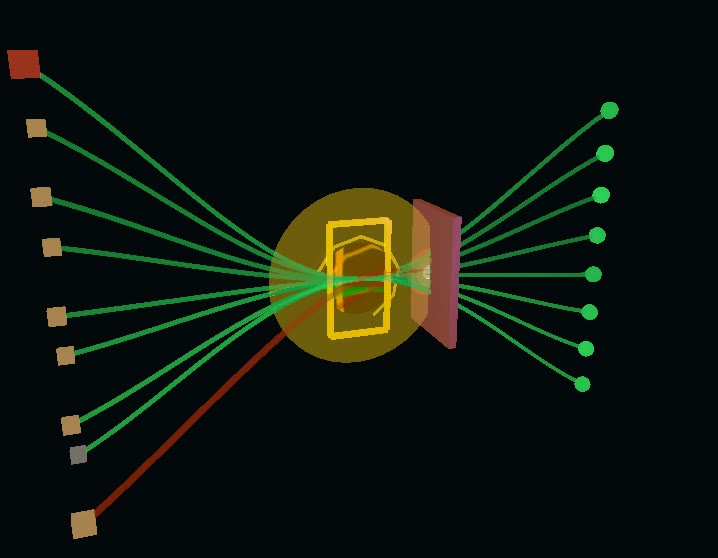
A captured recording of the scene's own cinematic camera sequence — not a live render on every page load. The interactive version is below.
The scene
Resting at the completed set — 8 of 9 findings landed and fixed, one stopped permanently at the wall. Press Replay below to watch all nine cross the gate.
Findings (9)
Sequence shown for clarity — all nine rows share one real capture date, not real timing gaps, so this plays them at a fixed, deliberately even cadence rather than implying a timeline that doesn't exist.
Select a finding
Click or arrow-key through the list to see one of the 9 real findings from this incident, or press Replay to watch all nine cross the gate in sequence.
This propose-and-approve discipline — findings that age instead of disappearing, fixes a human reviews and applies, and a system that knows the edge of its own authority — is what Standing Watch generalizes to a cross-platform enterprise estate.
This is one incident, in full detail. For the ongoing, aggregate record across the whole estate, see Automation Oversight →
Want the full picture for your environment?
A 20-minute intro call puts you in touch with the person who builds these engagements — not a form, a conversation.
Start a conversation